Map Your Organization Natively.
Control Permissions Effortlessly.

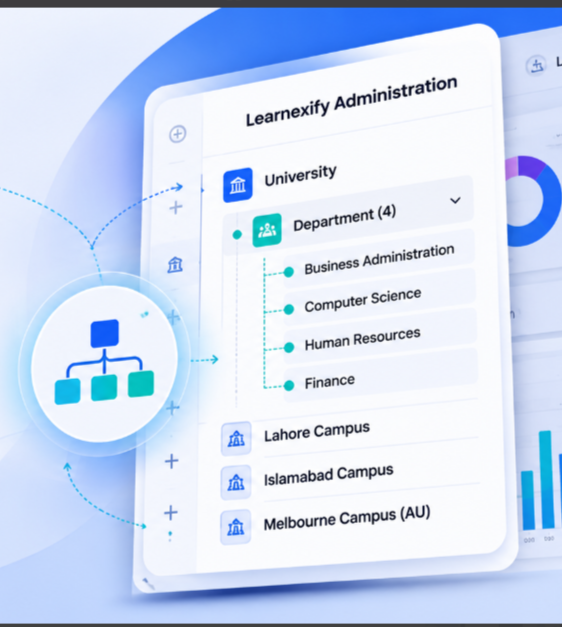
Stop forcing complex institutional or corporate structures into rigid, flat user lists. Learnexify's advanced Hierarchy Management engine lets you build, manage, and scale nested user sets that perfectly reflect your real-world organizational chart. Assign courses, manage permissions, and track aggregate compliance across multi-tiered departments with a single click.

The Core Purpose (The Philosophy)

Built for the Real Complexity of Growing Organizations

Most learning management systems treat users like a giant, disorganized spreadsheet. When you need to deploy a course to a specific group, manage varying levels of staff authority, or run a departmental progress audit, you are forced to manually tag users one by one or create messy, independent workarounds.

We engineered Learnexify with an intrinsic, multi-tier organizational mapping system because structure dictates efficiency. By mirroring your actual institutional or corporate framework directly within the platform, administration becomes intuitive. Create top-level parent sets, nest infinite sub-sets underneath them, and let permissions and course assignments flow down the chain naturally. It is a unified environment built to give you absolute control over your scaling ecosystem.

Eliminating the Administrative Friction of Flat User Systems

When software fails to match your actual organizational layout, your administrative team pays the price in wasted hours.

The Pain Points
1. Semester & Enrollment Configuration Grind

Wasting weeks manually launching individual class batches for every single course and separately assigning hundreds of students to those individual classrooms every semester.

2. Data Security & Permissions Mess

Granting sub-instructors, deans, or regional managers too much administrative access just so they can monitor their specific teams.

3. The Reporting Black Hole

The absolute inability to see how a specific division, office location, or academic department is performing as a collective whole.

THE PAIN
LEARNEXIFY SOLUTION
Learnexify Solution
Automated Tracks & Cascading Enrollments

Handle enrollment at the Program level. Launching a Track auto-creates class instances and enrolls cohorts instantly. Flow assignments from master groups down to nested sub-sets in seconds.

Scoped Role Boundaries

Assign roles to explicit branches of your hierarchy tree. Managers get absolute visibility over designated sub-sets, while global platform parameters remain completely invisible.

Aggregated Hierarchy Reporting

Pull data using advanced structural filters. Dynamically include or exclude sub-set trees to compile site usage and transcript metrics for entire branches without manual spreadsheet math.

Dual Persona Split

One structural engine. Custom fit for your institutional framework.

Universities & Colleges
(The Academic Tree)

Model your entire academic catalog and student body cleanly. Build your hierarchy from University Central Portal down to distinct Colleges, Departments, Semesters, and Batches. Manage course sets and generate live class rosters perfectly grouped by cohort.

Corporate & Enterprise
(The Workforce Pipeline)

Organize your workforce by operational reality. Segment permissions and tracking by Global Headquarters down to Regional Offices, Functional Departments, and Job Roles. Monitor onboarding pipelines, compliance certificates, and system usage profiles by specific teams.

Feature Deep-Dive: Administrative Controls

Precision Architecture Control Panels

Navigation Framework 01
Seamless User Set Navigation Tiers

Map your institution cleanly using a structured User Set framework. Establish master User Sets for each campus and nest sub-User Sets for individual departments, creating a clear navigation path. Say goodbye to confusing configuration sub-menus. Build and adjust your organizational architecture using a clean, visual hierarchy dashboard.

Access Security 02
Scoped Administrative Mapping

Safeguard system integrity by setting precise behavioral boundaries. Assign custom structural permissions to department heads, operations managers, registrars, or local site administrators. They gain full operational capacity within their assigned branch while the rest of the platform remains strictly locked.

Live Propagation 03
Single-Point Configuration Refreshes

Modify organizational settings, target parameters, or active fields from a centralized dashboard. Changes save instantaneously, automatically propagating throughout the underlying architecture levels without requiring system reboots or database re-indexing.

Bulk Operations & Automations

High-Velocity Group Action Tools

blueprint

Master Course Description Blueprints

Eliminate repetitive data entry when building out your academic catalog. Manage all core curriculum data including course content, document resources, and grading frameworks directly within centralized Course Description master records. When you design a Program, it pulls directly from these master blueprints. This ensures that when your administration launches a new Program Track, the system instantly generates perfectly configured active class instances for all associated semesters in one seamless action, maintaining absolute consistency across your entire department.

Push training and curriculum changes instantly. When a course description, document resource, or grading framework is assigned to a parent user set, all nested sub-sets inherit the configuration immediately. This completely eliminates repetitive manual data entry across identical departments.
notification

Targeted Notification Routing

Keep lines of communication efficient and precise. Send important updates, platform reminders, or policy announcements exclusively to a specific branch of your organizational tree. Reach the exact user sets that need the information without interrupting unrelated cohorts or locations.

reallocation

Multi-Tier User Reallocations

Moving students between batches or staff between regional offices shouldn't break their training history. Effortlessly shift individual profiles or entire user cohorts between hierarchy branches. The system instantly recalculates their training tracks, structural managers, and group-wise analytics.

Technical Control & Reporting Alignment

Fueling the Advanced
Reporting Engine

Your organizational structure shouldn't just look pretty on a dashboard—it should drive your operational intelligence. Learnexify's Hierarchy Management is fully hardwired into our analytics core.

When running complex audits, administrators can toggle the advanced "Tree Option" filter. This allows you to check a parent department box and instantly compile data from every single sub-set underneath it.

Whether you are generating comprehensive sitewide transcripts, gathering minute-by-minute time summaries for funding justification, or auditing active certificate expirations, your reports compile cleanly along your real-world organizational lines.

Transcripts
Funding
Audits
Advanced Reporting Engine Visual

Engine Status

Operational Intelligence

Why Modern Organizations Prefer Learnexify

Native Structural Intelligence vs. Chaotic Flat Lists

See how transitioning to a self-contained organizational hierarchy eliminates tracking friction compared to legacy, disorganized environments.

Legacy Platforms (e.g., Moodle)
01

Flat User Lists

Users sit in one massive, flat pool. Segmenting them into explicit cohorts or sub-departments requires complex, manual custom tagging.

02

Repetitive Course Assignments

Admin teams must manually assign courses to individual users or set up repetitive, independent enrollment rules for every group.

03

All-or-Nothing Permissions

Restricting administrative access is difficult. Sub-admins and managers often gain visibility into data from outside their assigned branches.

04

Fragmented Departmental Audits

Compiling reports for an entire division requires manual work, exporting fragmented raw spreadsheets and filtering data line-by-line.

05

IT Dependency for Structural Changes

Modifying database layouts, restructuring divisions, or moving active cohorts requires logging slow, technical IT support tickets.

Learnexify Hierarchy Engine
01

Native Nested Trees

Build infinite, dynamic parent-child groups that match your real-world organizational structure cleanly out of the box.

02

Structural Program Mapping

Map courses to parent nodes once. All underlying sub-sets instantly inherit course deployments and automatic user enrollments down the line.

03

Strictly Scoped Boundaries

Lock managers, instructors, and deans strictly to their explicit organizational branch, keeping localized data completely secure and isolated.

04

Multi-Level Workflow Reporting

Retrieve precise performance analytics across any specific organizational level with simple, one-click dashboard filtering.

05

Turnkey Admin Control

Reorganize user sets, adjust branch parameters, and shift active student tracks instantly using a simple, non-technical drag-and-drop interface.

Bring absolute clarity to your organizational training.

Discover how Learnexify's structural hierarchy mapping can take the headache out of platform administration for your team.

Book Your Structural Design Consultation